|
|
News that truly changes
everything?
Think of the thing inside
your computer that slows it down most. That's right... the old fashioned hard
drive. OK, so now think of how to fix
it. Perhaps...
+ Total Silent
Remember how computers use to make noise? Some were really loud. SSD have diminsihed the 'sound footprint' of PCs. There is simply no noise from an SSD.
+ Up to x100 faster access
The motors, the magnets, the heads flying ocross the disk surface of a convential hard drive - allll that - is totally eliminated. Fast access times mean applications open quickly, computers turn on in seconds, basically, you don't have to wait.
+ About 1/10th the power usage
With no motors, energy use is way down - to 10% of a conventional hard drive. Less heat, less cooling, longer lasting, quieter too!
+ Smaller, shock resistant, lighter
SSD come in popular 3.5", 2.5", and even 1.8" case sizes. Very lightweight, there are no moving parts to break.
Everyone knows computers
are supposed to have been getting faster and faster...but are they
really? No, and the answer is simple. Most old and even new PCs
still use a slow, pretty much 1970s era hard drive technology. Spinning
mechanical hard drives have been around for almost 30 years. They do nothing to
improve the overall performance of a computer, in fact they are the biggest
detriment to performance!
With time ripe
for change, technological advances have brought us
the Solid State hard Drive.
SSDs are a storage device made of MLC or SLC Flash memory. On the
outside they look much like - and can act like a spinning disk drive.
SSDs come mostly in 3.5", (mostly) 2.5" and 1.8" form factor. With no
mechanical or moving parts, they are similar to a flash memory thumb
drive, only much faster. Without doubt SSDs have taken over as the
storage of choice for the ultimate in fast computing.
If you are looking for
noticeable EVERYDAY speed, SSDs are the answer. Since SSDs are more expensive
on a cost/GB basis, often SSDs are combined with regular drives to
increase capacity.
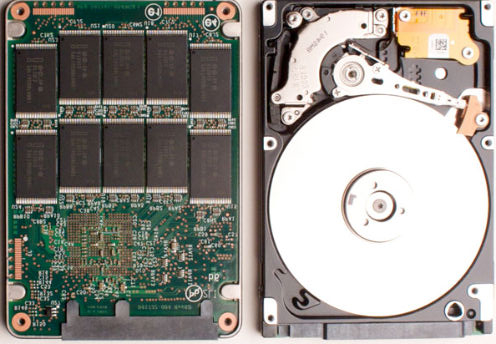
| SSD |
|
vs. Spinning disk drive |
Here's how SuperSpeed SSD work
better to give you EVERYDAY performance. Disks perform two types of data
access. One, random access, is where the disk is reading small files all over the
disk as fast as possible, and second is reading or writing large files. SSD
drives are about 100 times faster at random access of files, mainly because being
memory, random access time has vanished, at least in comparison to a normal hard
drive! The speed is noticeable at computer startup or shutdown, or opening a
program. The difference is HUGE! Next, SSDs are 'only' about 2-6 times faster
at reading and writing files large files compared to traditional hard drives.
Put those kind of times numbers together and you've got a computer that is so
amazing fast, you'll be spoiled almost immediately by the speed and
response! SSDs change everything.
This greatly
improves the user experience on a PC. Computer startup and shut down take mere
seconds. Applications load and run immediately. Saving is
very fast, and the overall computer simply feels alive with windows snapping
open.
On a server, startup
and shutdown are again greatly improved. The server can now be tuned so that ALL
components "share-the-load" equally. In this way equipment and energy savings
are recovered as less expensive hardware can be used for similar or often
far better performance.
We're experienced using the
tools and procedures necessary to update many old computers to this new
technology. We make
it easy to take any typical 0-3 year old computer - running Windows
XP to Windows 7 - and SuperSpeed it with an SSD. Best to use Windows 7 as it
understands SSDs best, performance-wise.
|
The
real performance differences between a conventional
hard drive and an
SSD.
Drive performance can be measured in two ways. 1)
Throughput or transfer speed in MB/sec and 2) random access time or
how quickly files spread around the disk can be gathered
up.
ATTO is a disk throughput benchmark that reads and writes
different sized chunks to a drive and displays the transfer speed
in MB/sec for each sized chunk.
The first drive tested, is a 7200 rpm Seagate.
It's
a good example of a mainstream high performance desktop hard
drive costing about $100. We see read and write speed plateaus
around 100MB/sec.
Next is an inexpensive SSD drive, about $80. Read
performance is roughly x2 the conventional hard drive or about
200MB/sec. Writes are a bit slower at 50% faster. Reads are
generally faster than writes, being that it takes longer to
erase and write than simply to read.
Last is a premium SSD drive. The read / write speed
plateau at about 700MB/sec. This is a greater than a x6 performance
multiplier.
The second performance metric comparison is a bit absurd.
The SSD is roughly 100 times faster, because an SSD has no moving
parts.
Typical conventional hard drives have
a average random access time of around 10ms, compared to SSD
that might spec a 0.1ms seek time or 100 times
faster.
Today's mainstream SSDs are a performance bargain, even if
significantly more expensive than traditional disk drives.
|
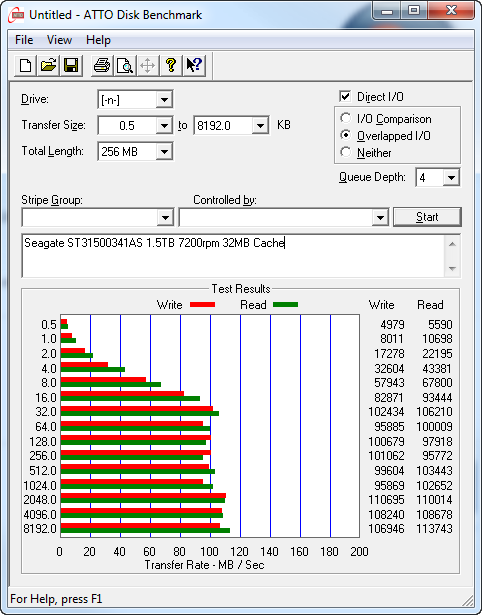
Chart 1 - Conventional
Disk Drive Performance
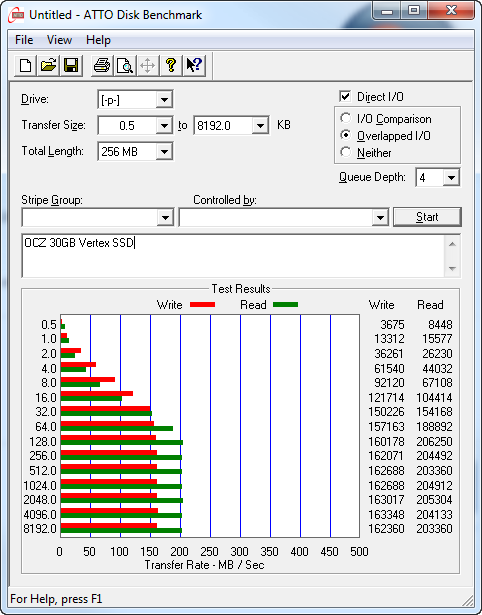
Chart 2 - Low Cost SSD Performance
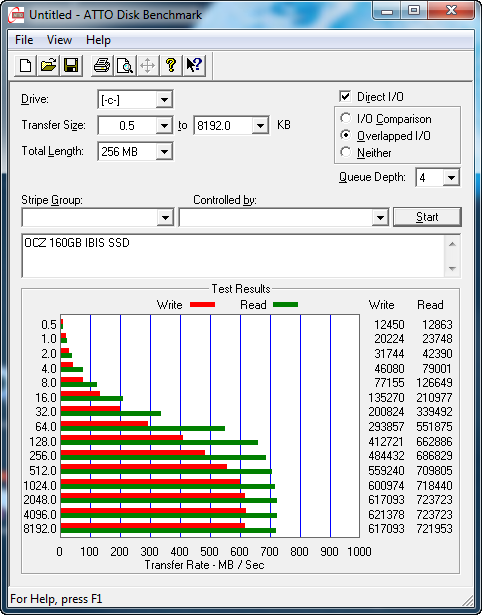
Chart 3 - Premium SSD Performance
|
|