|
|
Can I speed up my existing PC?
Until
recently, there was little to do to speed up an older PC except "add more
memory". That worked in some cases, but the benefit was incremental, not
astounding by any means.
Fast forward to
today, your old spinning hard drive can be replaced with an
SSD. What with an SSD
being totally silent,
up to 100 times
faster, 1/10th the power
usage, smaller, shock resistant, and lighter, there's not much to
loose in upgrading to SSD...and a lot of speed to gain.
Is my PC
upgradable?
Any PC running
Windows XP or Windows 7 can use an SSD. Windows 7 is the better choice as it knows
how to maintain an SSD for best performance life. Some vendors have
manual maintenance software for Windows XP, some do not. For a heavily used
PC, stick with windows 7. Also most SSDs use the SATA 3 or SATA 6 interface, just
like current generation spinning hard drives. If the unlikely event your PC doesn't
have SATA drives now, an adapter card must be added to your
system.
The last concern is
with SSD capacity. Most SSDs are smaller than typical hard drives, so when
upgrading, you most likely will want to keep your old hard drive in your system for
archival storage. Your current drive as delivered to us must fit within
the capacity of the SSD you choose. If it doesn't, we may need to use a larger
SSD, or give you PC a fresh OS install then you can add data files back
and install applications only as you need them.
How much
does an SSD upgrade cost?
|
|
|
|
|
|
We cannot be
held
responsible
for data loss or corruption.
PLEASE BACKUP YOUR
PC!
Or ask us to do it
for you.
|
|
|
|
|
|
|
We use drives from various manufacturers. These include Intel, Kingston, and
Crucial drives, among others.
We recommend SD drives of 80GB -160GB (~$150-$400) size. This gives plenty
of room for Windows 7 install plus leaving space for your own files.
For bigger storage needs, up to 1T SSD drives are available.
Remember, except for notebooks that use a singe drive*, your
original hard drive is left in the machine and becomes your backup or
large file storage drive. Your SSD becomes the boot drive and where all
programs are working files are located. This give maximum performance and
storage space.
Call for best
price and to discuss your needs. The total upgrade cost includes the drive price
plus a one-time upgrade labor cost of $120. Labor covers cloning your
existing hard drive to an SSD of sufficient size. Our custom SSD
Upgrade service clones and reduces the space needed by the boot drive in one
step. If you want a clean operating system install on your new SSD (erase and
reinstall) rather than a clone, this optional service using your existing
original license is available for an additional
$60.
*Bring in or ship us
your PC or notebook**, we will expertly copy your existing hard drive onto a new
SSD, then remove and replace your hard drive. What this does for the user
experience on a PC is phenomenal. Computer startup and shut down take mere seconds.
Applications load and run immediately. Saving is instantaneous, and the overall
computer simply feels SuperFast with windows snapping to the
forefront.
** notebook drives must
be user replaceable. We DO NOT disassemble notebooks.
If you have a large
number of PCs to upgrade (>5), or want to upgrade your entire network of PCs, we
can come to you and do your upgrades in place. Please call for special
pricing.
|
Understanding
drive performance and why SSDs are
better.
Drive performance can be measured in two ways. 1)
Throughput or transfer speed in MB/sec and 2) random access time or
how quickly files spread around the disk can be gathered
up.
ATTO is a disk throughput benchmark that reads and writes
different sized chunks to a drive and displays the transfer speed
in MB/sec for each sized chunk.
The first drive tested, is a 3.5" Seagate.
It's
a good example of a mainstream high performance desktop hard drive.
We see read and write speed plateaus around
100MB/sec.
Next is an inexpensive SSD drive. Read performance is
roughly x2 the conventional hard drive or about 200MB/sec. Writes
are a bit slower at 50% faster. Reads are generally faster than
writes, being that it takes longer to erase and write than simply
to read.
Last is a premium SSD drive. The read / write speed
plateau at about 700MB/sec. This is a greater than a x6 performance
multiplier.
The second performance metric comparison is a bit absurd.
The SSD is roughly 100 times faster, because an SSD has no moving
parts.
Typical conventional hard drives have
a average random access time of around 10ms, compared to SSD
that might spec a 0.1ms seek time or 100 times
faster.
Today's mainstream SSDs are a performance bargain, even
though costlier per GB than traditional disk drives.
|
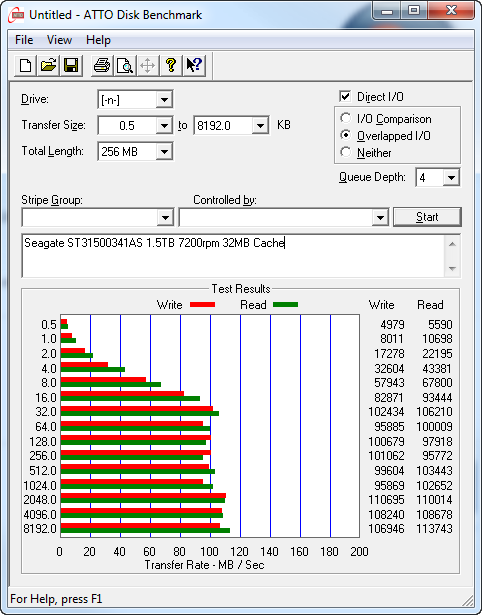
Chart 1 - Conventional Disk
Drive Performance
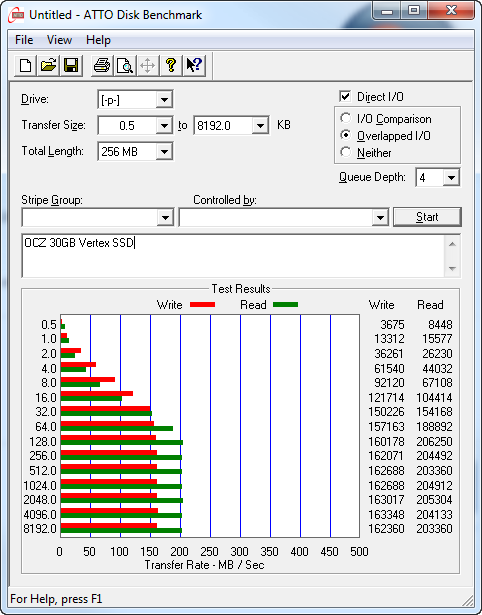
Chart 2 - Low Cost SSD Performance
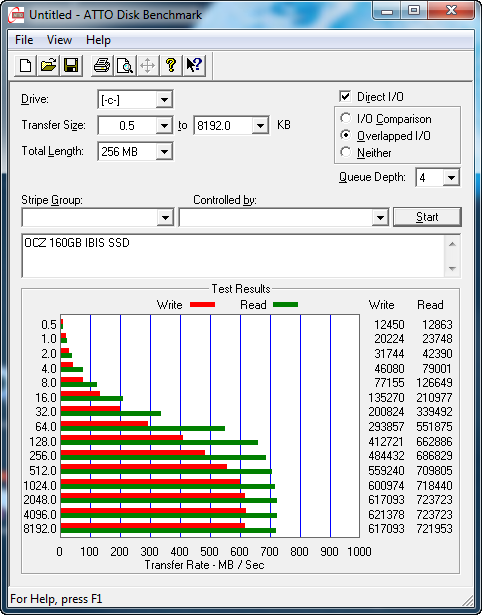
Chart 3 - Premium SSD Performance
|
|