|
From
the Lab
We
got a new really fast OCZ SSD drive in to test recently - an IBIS 160GB 3.5" unit with amazing specs that place it
squarely in the "exotic" category. We try to find the best balance in components to maximize performance while
using hardware that is economical to give a balanced performance profile. This may be a bit over the top
for an inexpensive server, or not, but the best way to find out is to use it. Bottom line, it's a R.A.I.D. 0 array
of fast SSD drives equal to 160GB total.
The OCZ IBIS Series redefines desktop storage and surpasses at the
limitations currently placed on not only hard drives, but other SSDs. As the
first SSD to make use of the trailblazing HSDL interface, the IBIS delivers dominating performance for a faster,
more responsive PC experience that is bootable to run the latest OS. Developed for blazing speeds to increase
productivity for an enhanced computing experience, the IBIS is capable of delivering 750MB/s read/write speeds and
up to 125,000 random write IOPS. Each IBIS features a robust 3.5” aluminum housing and is bundled with a single
port HSDL adapter card.
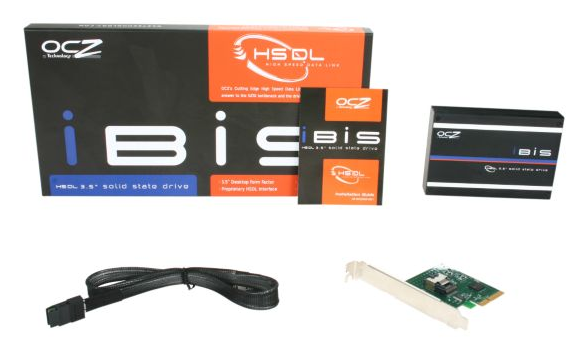
Unsatisfied with current interface options, OCZ developed High Speed Data Link or
HSDL, to eliminate the existing I/O bottlenecks and take SSD technology to new heights. HSDL is capable of running
up to 20Gbps of data bandwidth per channel, far surpassing the speed of existing storage interfaces. OCZ’s Cutting
Edge HSDL interface is the answer to the SATA bottleneck and the driving force behind the IBIS SSD.
It's found a home in one of our servers that has Windows Small Business Server 2011 installed.
The server hardware itself is a Phenom II 840T quad core, a relatively modest platform with a generous 12Gb of
memory.
With the IBIS installed, the SBS server OS experience is very smooth and responsive. We must say much better than
a system of similar power with a conventional multi-drive R.A.I.D. storage setup. This drive is
dedicated to the operating system and email, so other drives were installed for user data. To maintain the
idea of space and energy saving choices were to use 2.5" drives exclusively for user data and backup.
The lack of multiple hard drives grinding away, their noise, heat, electricity usage, fans, etc is the big takeaway
here.
To maintain the idea of
space and energy saving choices were to use 2.5" drives exclusively for user data and backup. One goal was to
create an cutting edge server. Efficient, powerfull - but small and quiet. Perfect for the modern office
environment.
Incorperating SSDs cut energy use, improves performance, and fits in less space. The complete solid state server
has arrived!
Also noteworthy is the balance of CPU power - memory - SSD performance. We tried to pick a
server with a modest CPU, give it a generous amount of memory to work in, and last, a super-fast SSD hard
drive makes for the best server response. Servers tend to respond slower than desktops. Creating a server that
responds as though it was a fast desktop is something we're always after. The SSD balances the CPU and memory well
- balance is best!
More to come.
by Corrius - 3/1/2011
Back to
Top
###
From
the Lab
One of our recent server installs was a using the same system as above, except rather than an IBIS SSD, we used a
mainstream single SSD drive of 128GBs. We installed Windows Small Business Server 2011. The install was
reasonably short, and there were no problems of drive recognition. The server hardware was a Phenom II 840T quad
core with a generous 12Gb of memory.
The SBS server OS experience is smooth and fairly responsive. It's definitely faster than a comparable
server with similar CPU power and a conventional multi-drive R.A.I.D. storage setup. The server
is nice and quiet, with only occasion CPU fan noise noticeable.
Being a server, typically a redundant storage is used. In this case however, the redundancy is in the ability to
quickly restore a recent "snapshot" of the main drive should problems arise. The fact that there is only
a single hard drive, provides economies in size, power usage, while providing improved server response. This
highlights the fact that backup is not just an archiving process, but an active partner in providing
day-to-day redundancy.
by Corrius - 3/1/2011
Back to
Top
|